Animations
Tutorial for playing and troubleshooting Blockbench animations
Figura can play animations from Blockbench using the Animation API.
Playing an Animation
In order to play an animation you need to index the animation through the Blockbench model it is in and the animations global.
Let's say we have a Blockbench model named example

and an animation named idle

If we want to play this animation we can use this code:
animations.example.idle:play()
animations stores all the animation data for every Blockbench model.
The next part of the index is always the Blockbench model name that contains the animation you want to play, in our case this is example.bbmodel. Note that the .bbmodel file extension is not included. If your model is within one or multiple subfolders, those are also included in this section, e.g.: animations["subfolder.example"].idle.
The final part of the index is the animation name, in this case idle.
Alternatives to play()
There is another function that can play animations, setPlaying(bool)
You can put a boolean value inside the parenthesis for the function and it will play the animation if the boolean is true, or stop it if the boolean is false
This is often used for toggles in the action wheel.
setPlaying Example
By nature, setPlaying needs to be in a function that will run multiple times. We will use a tick event, but it functions in any scenario.
function events.tick()
    local crouching = player:getPose() == "CROUCHING"
    -- This detects if you are crouching and stores it into crouch.
    -- So: crouch == true when crouching, and crouch == false when you're not crouching
    animations.example.idle:setPlaying(crouching)
end
And now our animation idle will play whenever we're crouching!
This methodology can be expanded infinitely but it gets more complex the more animations you add.
Simple Idle-Walk-Sprint-Crouch Setup
As an example we'll do code for a set of four animations: idle, walk, sprint, and crouch. Here's our animations in our Blockbench model.
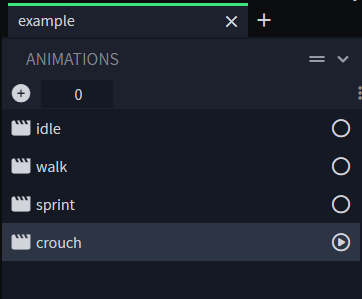
function events.tick()
    local crouching = player:getPose() == "CROUCHING"
    -- This is the same line of code from the previous example
    local walking = player:getVelocity().xz:length() > .01
    -- walking == true when moving, and walking == false when still (or going directly up/down as we excluded the y axis)
    local sprinting = player:isSprinting()
    -- If you want to find more player functions, check out the Player Global page

    -- Now we're going to use a lot of logic to figure out when animations should/shouldn't play
    animations.example.idle:setPlaying(not walking and not crouching)
    -- You're idle when not walking and not crouching
    animations.example.walk:setPlaying(walking and not crouching and not sprinting)
    -- You're walking when... walking and not crouching, but you want to make sure you're not sprinting either
    animations.example.sprint:setPlaying(sprinting and not crouching)
    -- You probably can catch my drift by now
    animations.example.crouch:setPlaying(crouching)
end
Common Errors
Fixing the index error
You might run into some script errors while doing this, here's some solutions to attempt to index ? (a nil value)
The error will tell you about a key, the key is AFTER the part that's experiencing an incorrect.
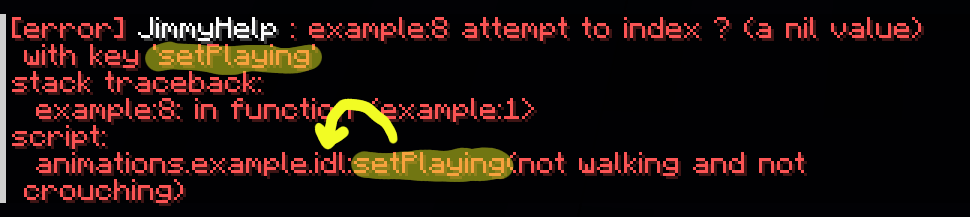
Like in this example, it says that setPlaying is the key, so we know that the problem is BEFORE it.
You'll notice that the animation name is misspelled, once you fix that the error will go away or change.
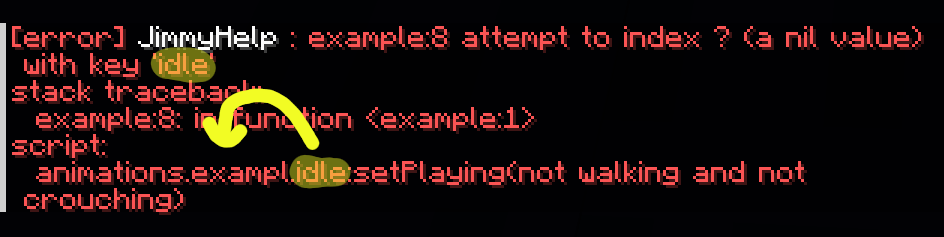
Here it is again, but this time the key is idle, meaning the problem is with the Blockbench model name.
You'll notice that it's misspelled in this version, fixing it will make the error go away or change.
Errors inside a keyframe
Errors inside keyframes are vary vastly, but you can identify them by the name of the animation in the error. Here's three examples:
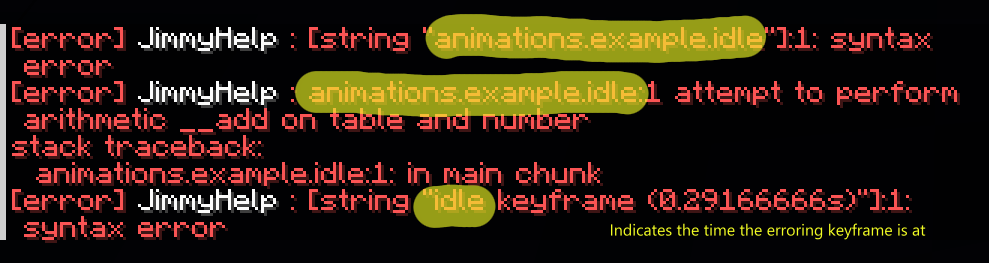
How you fix this will greatly depend on what the error is.
Overriding Vanilla Animations
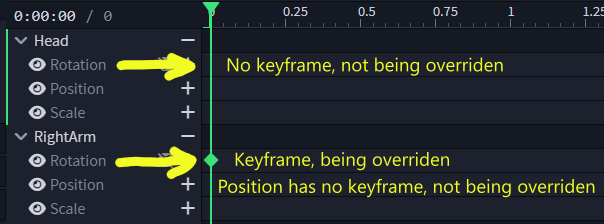
You can override vanilla animations using the override setting in Blockbench, this is set per-animation and it overrides per-part and per-channel (rotation, position, scale). It only overrides while the animation is playing.

Special Keyframe Types
Blockbench animations have a special category of keyframes called Effects keyframes. There are three of them, but Figura ignores Particle and Sound.
Instruction Keyframes
The third special keyframe type is Instruction. Instruction keyframes run Lua code when the animation reaches that keyframe. This can be used to play sounds, spawn particles, literally anything. Remember that Lua code is what goes in this spot, not Molang. The Lua code to play in an instruction keyframe is placed in the Script box in the left sidebar.
Each instruction is its own 'scope' meaning that variables local to any of the scripts can't be accessed by the keyframes without specifically interfacing between them.
Community Resources
Jimmy's Animation Handler
If you have a lot of animations that need detections, Jimmy's Animation Handler can play your animations for you. Find it here on GitHub
GSAnimBlend
If you want to smooth the transition between animations so it doesn't jump between them you can use GSAnimBlend. Find it here on GitHub